MEET THE PRODUCT
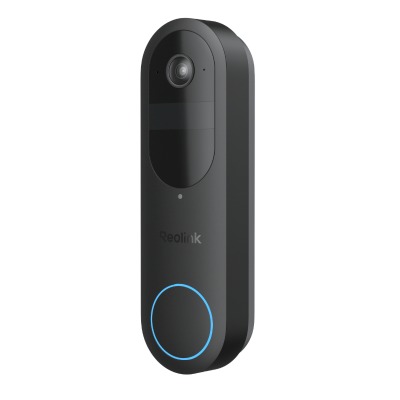
Reolink Battery Video Doorbell (2nd Gen), in everyday life.
We used the Reolink Battery Video Doorbell (2nd Gen) on battery power for about six weeks, drilled to the wall beside a sunny driveway, with the Reolink chime inside and a microSD card for recordings. Doorbell alerts reached our Samsung phone in about three seconds on average, and the 1:1 picture showed visitors from head to toe with a parcel on the doorstep in the same frame. Everything we relied on worked without a subscription. The catches were a live view that sometimes buffered until we restarted the app, and a battery that needed recharging after about 30 days on a very busy driveway, far short of Reolink’s “up to 300 days” claim.
THE DETAILS YOU WILL NOTICE
What it brings to your day.
Deliveries while you are out
When we were away from home, the doorbell let us talk to couriers and visitors, tell them where to leave a parcel or explain when we would be back. That is where a video doorbell earns its place.
Finding footage when something happens
When a car hit a lamp post outside, we found the clip on the microSD card and downloaded it from the app within a few minutes. No subscription was needed.
A busy family front garden
When children play in the front garden, the doorbell sees the same people again and again and sends an alert each time. On busy days we received 50 to 60 notifications. Detection zones help, but a setting that recognises people who stay in view would help more.
Setting it up
The first full charge took about four and a half hours. Installing the app and creating an account took about two minutes and only needed an email address and password. If you type your Wi-Fi password wrong, do not press back: the app would not let us correct it, and we had to restart setup. With the right password it connected after a short wait. The firmware was already up to date, and the app showed clearly how to fit the microSD card and pair the chime.
Fitting it to the wall
We drilled into the wall and used the supplied backplate, which took about ten minutes. The printed drilling guide is helpful, but its adhesive would not stick to our brick, so we held it in place with extra tape. Removing the doorbell to recharge it needs a small release tool, so keep that somewhere safe.
Picture quality, day and night
The 1:1 picture, which is as tall as it is wide, showed visitors from head to toe with a parcel on the step in the same frame. Our doorbell faces a driveway in direct sun, and HDR (which balances bright and dark areas) kept faces clear with little washed-out sky. At night we needed the app’s Clear setting, its higher-quality stream, to make out a face. The faster Fluent setting struggled with faces at night.
Alerts, live view and talking to visitors
Across ten presses, alerts reached our phone in about three seconds on average, and each one said whether it saw a person, vehicle, animal or parcel. Opening the live view usually took two or three seconds, but sometimes it buffered or would not open until we restarted the app, even though our other devices were connected. Two-way talk was clear with a slight delay, and the quick replies, pre-recorded messages for visitors, are useful if you are often out.
Detection, battery and the chime
Detection was very sensitive: it caught everyone who came onto our property and recognised parcels, with occasional false alerts from passing cars and animals. That sensitivity costs battery. With 50 to 60 alerts on busy days and four or five live views a day, we recharged after about 30 days. Reolink’s 300-day figure assumes five minutes of recording a day. The Reolink chime, by our front door, was heard throughout our two-bedroom house and in the back garden.
THE WHOLE PICTURE
The reasons to choose it.
The reasons to pause.
What works in its favour
- Doorbell presses arrive like a phone call, so answering a visitor feels clear and calm
- The 1:1 head-to-toe view shows a visitor and a parcel on the doorstep in one picture
- Recording to a microSD card works without a subscription, and finding clips is easy
- Easy to install with the printed guide, and the chime is loud with several tones
The compromises
- The live view sometimes buffered and needed an app restart
- No way to stop repeated alerts from the same people, so a busy garden floods your phone
- Battery lasted about 30 days with heavy use, far short of the “up to 300 days” claim
- Night-time faces were hard to make out unless we switched the stream to Clear
 Amazon product listing image
 Amazon product listing image
 Manufacturer product image · TP-Link